
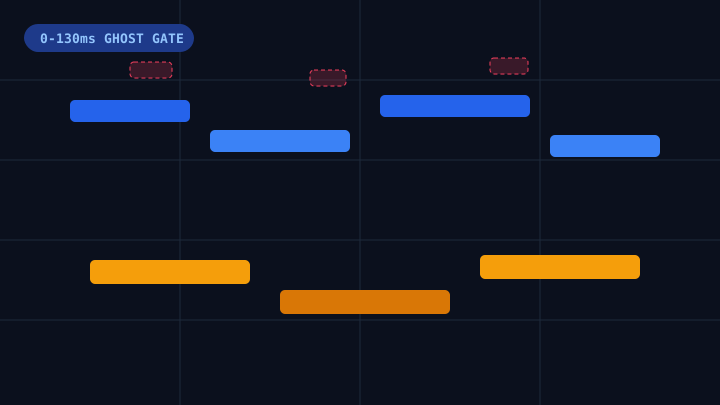
When music producers run a polyphonic audio to midi conversion on a solo piano, acoustic guitar, or multi-voice synth stem, the single biggest obstacle is harmonic ghost-note clutter. Instead of receiving a clean chord progression that drops straight into a DAW, unfiltered pitch detectors scatter dozens of tiny 15ms to 45ms micro-notes an octave or a twelfth above the actual performance. Understanding why these spectral artifacts appear and how to filter them before download turns a messy raw draft into a studio-ready sequence.
Why Acoustic Chords Trigger Ghost Notes in Polyphonic Audio to MIDI
Every acoustic instrument vibrates at a fundamental pitch (f0) alongside integer harmonic multiples (2f0 an octave higher, 3f0 an octave plus a fifth higher, and 4f0 two octaves higher). During a monophonic melody, a basic tracker only has to pick the loudest single frequency peak. In polyphonic audio to midi transcription, however, multiple fundamentals overlap in the same time window while their upper harmonics collide across the spectrum.
- Sympathetic String & Damper Pedal Resonance: When a pianist depresses the sustain pedal and strikes a low C2-G2 fifth, the un-damped upper strings vibrate sympathetically at C4, E4, and G4. Frame-by-frame pitch estimators often classify those brief sympathetic spikes as independent keystrokes.
- Hammer & Pick Attack Transients: The first 20ms to 40ms of a piano hammer strike or guitar pick pluck contains broadband percussive energy. Without a minimum duration gate, a polyphonic audio to midi detector converts those non-pitched attack clicks into ultra-short notes scattered across high octaves.
- Lossy MP3 Pre-Echo Smearing: Compressed 128kbps and 192kbps MP3 files use Modified Discrete Cosine Transform (MDCT) blocks that smear sharp transient energy slightly backward in time. That pre-echo ringing frequently causes duplicate trigger notes right before the downbeat.
- Unquantized Floating-Point Timestamps: Even when pitches are detected accurately, raw floating-point note starts and release tails drift off measure barlines, making the exported clip difficult to loop or layer inside a DAW.
How to Clean Up Chords Before Exporting Your .MID File
Instead of exporting an unfiltered file and spending thirty minutes deleting stray notes by hand inside your DAW, you can clean up the sequence interactively inside our online Audio to MIDI Converter. Because audio decoding runs locally inside your browser via Web Audio API, every parameter change updates the 88-key Piano Roll in real time.
Step 1: Set the 0-130ms Ghost Note Filter Threshold
Open the collapsible DSP Controls drawer above the Piano Roll and locate the Ghost Note Filter slider. By default, it is set to 65ms, which strips brief harmonic partials under 65 milliseconds while preserving genuine sixteenth notes and deliberate grace notes.
- For Clean Digital Synth Stems (45ms to 55ms): Synthesizer recordings have controlled harmonic envelopes and minimal room reflection, so a lighter 45ms to 55ms gate keeps rapid arpeggiator runs intact during polyphonic audio to midi processing.
- For Acoustic Grand Piano With Sustain Pedal (65ms to 80ms): When working in our dedicated Piano Audio to MIDI Converter, raising the gate to 70ms or 80ms eliminates pedal resonance and upper-octave overtone bursts.
- For Fingerpicked Acoustic Guitar & Vocal Harmonies (70ms to 90ms): Acoustic guitar fret squeaks and vocal breath intakes last 30ms to 60ms. If you are transcribing stacked singing parts in our Vocal Audio to MIDI Converter, a 75ms to 85ms threshold clears sibilance spikes immediately.
Step 2: Snap Chord Onsets to a Musical Beat Quantization Grid
Once harmonic clutter is removed, select your rhythmic subdivision under Beat Quantization (Off, 1/4, 1/8, 1/16, or 1/8T triplets). In polyphonic audio to midi chord progressions, human performers rarely strike all four notes of a triad at the exact same millisecond; fingers roll across keys with a 15ms to 35ms spread.
- 1/16 Grid for Pop, EDM & Hip-Hop Loops: Snaps rolled chord onsets to clean sixteenth-note boundaries so your exported
.MIDclip locks tightly to drum racks in Ableton Live, Logic Pro, or FL Studio. - 1/8T Triplet Grid for Jazz, Blues & Cinematic Compound Meters: Preserves swing and triplet feel without flattening triplet pickups into straight sixteenth notes.
- Quantization Off for Expressive Solo Rubato: If you are archiving a classical piano performance where tempo breathes naturally, leave quantization set to
Offwhile keeping the Ghost Note Filter active.
Step 3: Separate Right and Left Hands With SMF Format 1
One of the most common frustrations with basic polyphonic audio to midi tools is that they output a Format 0 file where bass notes and high melody lines are merged onto a single MIDI channel. When you open a merged channel in a DAW or a piano trainer, you cannot assign separate instrument patches or practice one hand at a time.
Our engine automatically encodes every download as a Standard MIDI File Format 1 (.mid) split at Middle C (C4, MIDI note 60):
- Track 1 (Right Hand Treble, C4 and Above): Shown in sky blue on the 88-key Piano Roll, carrying lead melodies and upper chord voicings.
- Track 2 (Left Hand Bass, Below C4): Shown in teal on the 88-key Piano Roll, carrying basslines, root octaves, and lower arpeggios.
Recommended DSP Gate Settings by Instrument Stem
| Source Stem Type | Ghost Note Gate | Quantization Grid | Hand Split Mode |
|---|---|---|---|
| Solo Grand Piano (Pedaled) | 70ms - 85ms | 1/16 or 1/8T | Dual-Track C4 Split |
| Electric Piano / Rhodes | 55ms - 65ms | 1/16 Grid | Dual-Track C4 Split |
| Acoustic Steel-String Guitar | 65ms - 80ms | 1/16 Grid | Both / Single Stem |
| Analog Polysynth Pads | 45ms - 55ms | 1/8 or 1/16 Grid | Dual-Track C4 Split |
| Stacked Choir & Vocal Harmony | 75ms - 90ms | 1/8 or 1/16 Grid | Dual-Track C4 Split |
Source Audio Preparation Checklist for Cleaner Transcription
You can improve any polyphonic audio to midi workflow even further by feeding the detector a clean audio stem:
- Prefer Isolated Stems Over Mastered Full Mixes: A full stereo master with kick drums, snares, vocals, and guitars playing together contains broadband percussion that masks harmonic pitches. Isolate the piano, guitar, or vocal stem first before converting.
- Use Lossless WAV or High-Bitrate MP3 (256kbps-320kbps): Whenever possible, upload 16-bit or 24-bit WAV or FLAC stems so sharp chord attacks are not blurred by low-bitrate MP3 compression.
- Trim Excessive Hall Reverb Tails: Heavy cathedral reverb sustains old chord frequencies into the next bar. Drying up the stem or nudging the Ghost Note Filter up by 10ms keeps measure transitions crisp.
Test Your Recording With Free 15-Second Browser Audition
Ready to test these DSP settings on your own tracks? Drop any MP3, WAV, FLAC, or M4A recording into the Audio to MIDI Converter to decode your file locally in your browser, audition the cleaned 88-key Piano Roll with our built-in Web Audio grand piano synth, and download a free 15-second .MID sample before spending a single credit on full-length polyphonic audio to midi exports.